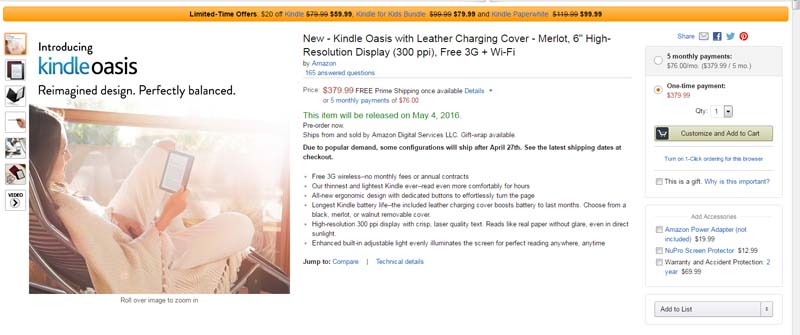
 I just accidentally stumbled across a listing for the Kindle Oasis with the highly sought after Merlot cover shipping as soon as May 4th. The configuration available is the 3G plus WiFi model without special offers. Be warned,though – the price tag for the e-reader and cover is a whopping $379.99! Amazon is also offering a payment plan of five monthly payments of $76 to ease the sting. But, hey, if it is the cover color of your dreams, the May 4th delivery date is much more appealing than some of the June, July and even September dates being discussed on the forums.
Category Archives: eReaders
Vegans want an alternative to leather Kindle Oasis cover
 With a $290 price tag, Amazon is definitely marketing the new Kindle Oasis as a luxury item. The cover Amazon has chosen is also what most would consider a luxury item: a finely-crafted leather cover. While it comes in a choice of three colors, leather is the only option.
That creates a dilemma for some, however. Many people who are vegan or vegetarian not only do not eat meat, but also refuse to use animal products for ethical reasons. Most vegans would refuse to have the cover in their homes. And in case you think that is just a few people looking for that option, take a look at the product Q & A forum. At the time of this writing, there are 592 comments on the thread post, most with remarks like these:
This was my first question as well. They have every right to offer leather, but they just eliminated millions of people who won’t buy it, what an idiotic decision when all they had to do was offer a fake leather option.
~
One more ethical vegan who will definitely not buy an e-reader only available with a leather cover.
~
I noticed this too and am very disappointed to see that that there isn’t an option to selected cruelty-free “vegan leather”. As an ethical vegan, I do not buy leather products and therefore will not consider this new Kindle. Amazon, please offer more compassionate choices in the future.
Many are saying that they will Keep using their Paperwhite and Voyage e-readers instead because there are leather alternatives available for those e-readers.
One customer suggested that concerned vegans write customer service to express their concerns and ask for this option.
Sara Farr feels so strongly about it, she took it one step farther and started a petition on Change.org to try to get Amazon to sell a vegan alternative, or better yet, stop selling the leather altogether. She says:
The new kindle oasis is awesome for book worms, but not if they’re vegan (or a cow for that matter). The only cover options are leather, which is not kind and limits options for people who don’t want an animal to die for a good story. I want Amazon to offer a vegan cover option (or even better make all covers vegan!) so we can all enjoy this new technology.
If you also want a vegan and animal cruelty free alternative, you can sign the petition on change.org here. You can also contact Amazon customer service or write kindle-feedback@amazon.com to express your opinion on the topic.
Thanks to Karen for the tip!
June ship date for the new Kindle Oasis?
 Evidently , there is quite a bit of interest in the new Kindle Oasis. On the Amazon’s Kindle Forums, customers are already reporting ship dates for some models pushed back until June. Earlier today, I was already seeing “Due to popular demand, some configurations will ship after April 27th. See the latest shipping dates at checkout” notices on the page.
From what I am reading, the issue seems to be tied into specific cover color choices and whether or not you want the no special offers option. The no offers version seems to be the one with a later ship date. Here’s a tip if your color option is in stock and you don’t want to delay delivery: Order the special offers version and see if you can pay Amazon to remove the offers after the fact. On every Kindle or Fire that had special offers included, Amazon has allowed customers to pay a fee to opt out. The Kindle Oasis isn’t listed yet, but the device is not technically released.
Here’s the Amazon page with instructions for removing special offers.
New Kindle Oasis official
 Amazon has officially announced its new Kindle Oasis. The device will cost $289.99, includes the special leather battery charging cover and will begin shipping on April 27, 2016.
Now, for the details. According to the Amazon press release, the Oasis is:
All-New Design–The Thinnest and Lightest Kindle Ever
The new Kindle Oasis is unlike any Kindle you’ve ever held. With an incredibly thin display and an ergonomic grip, Kindle Oasis weighs just 4.6 ounces and is just 3.4 mm at its thinnest point–30% thinner on average and over 20% lighter than any other Kindle. To achieve this, Kindle Oasis has a featherweight polymer frame that is plated with metal by structural electroplating–this makes the device incredibly light while ensuring it has the strength and rigidity of metal so it is resilient enough to take anywhere you want to read.
Designed for Comfortable and Extended Reading
Kindle Oasis is designed for extended reading sessions–with an entirely reimagined shape, Kindle Oasis shifts the center of gravity to your palm, to rest in your hand like the spine of a book so that the device feels balanced for one-handed reading. Effortlessly turn the page with either the touch display or physical buttons. Oasis is comfortable to read on with either hand–a built-in accelerometer detects whether you are reading with your left or right hand, and automatically rotates the page and page turn buttons to match.
Dual-Battery Design Delivers Months of Battery Life–Our Longest Ever
Kindle Oasis introduces a new dual-battery system–as soon as you connect the cover to Kindle Oasis, the battery in the cover begins recharging Kindle Oasis automatically. The battery in the cover uses a custom cell architecture that optimizes power and energy while keeping an incredibly small and light form factor and delivering months of battery life. You can charge the device and cover simultaneously while both are snapped together and plugged in. Plus, a new hibernation mode minimizes power consumption when your Kindle is inactive.
The included charging cover is made of high-quality leather and is available in black, merlot, or walnut. The cover opens like a book and fits closely around the bezel, waking Kindle Oasis when opened and putting it to sleep when closed. Twelve magnets form a secure and solid attachment between the device and cover, while ensuring it is easy to detach when you choose to read without the cover.
Next Generation Paperwhite Display
Kindle Oasis features the latest generation high-resolution 300 ppi Paperwhite display for crisp, laser-quality text. A redesigned built-in front light features 60% more LEDs for our brightest Kindle display ever and leverages new cylindrical diffractive patterns to increase the consistency and range of screen brightness for improved reading in all types of lighting. The new Paperwhite display on Oasis is the first Kindle display designed using a ground-breaking 200 micron display backplane that is as thin as a single sheet of aluminum foil, but is robust enough for you to throw in your bag and take with you on-the-go, combined with a custom cover glass engineered from chemically-reinforced glass.
Most of this information (save for the shipping date and price) had already leaked online. You can find more detail on the device here.
Comparing the Kindle Oasis to the previous Kindle models, this one is thinner, lighter, has better LED lighting and a totally unique design. Here is the chart comparing the features on the various models:
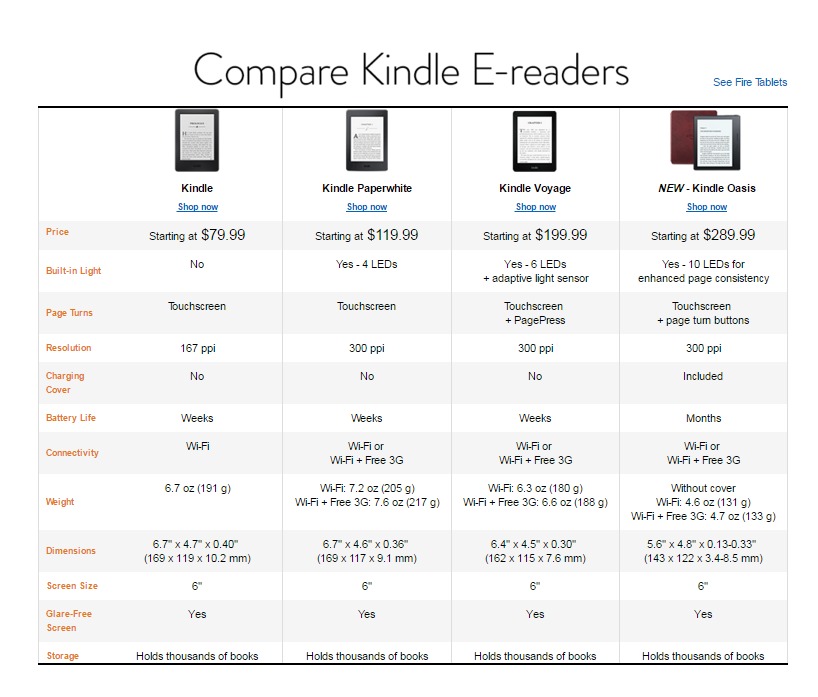
Click = big
There is evidently quite a bit of interest in the Oasis. Already, I am seeing “Due to popular demand, some configurations will ship after April 27th. See the latest shipping dates at checkout” listed on the item page. I am also seeing an offer to purchase this for 5 monthly payments of $58.00, but I am a prime member, so I don’t know if everyone sees that offer. It will be interesting to see if this sells out. Hint: Don’t delay too long if you are interested.
I will be back later with some thoughts about the new device, including talking about some of the features some of us were hoping for but didn’t get.
So, does this model interest you?
Bezos announces new Kindle
Today, Jeff Bezos himself let the world know that there is a new Kindle coming:
Heads up readers – all-new, top of the line Kindle almost ready. 8th generation. Details next week.
— Jeff Bezos (@JeffBezos) April 4, 2016
The fun is already starting on the speculation on this one. The phrase “top of the line” hints at at a new Kindle Voyage model. There has been speculation for a while about a Voyage 2 model.
On the other hand, the lasted iteration of the Paperwhite is the one with the generation number, not the Voyage.
I find it somewhat interesting that the announcement by Jeff Bezos (unusual in itself) comes the same day as Amazon is offering big discounts on current Kindle models. Today, if you subscribe to Amazon Prime, then you get $30 off the basic Kindle, thePaperwhite and the Kindle Voyage.
I was considering buying a new Paperwhite (today’s savings are great!) but now I am not sure. I didn’t buy a Voyage because the improvements were not enough to make me pull the trigger on a new one.
People are already making wish lists for the new models. Do you want to see better fonts, the return of text-to-speech, a bigger or better screen. Are you interested in the newest shiny thing or are you happy with what you’ve got? What’s on your Kindle wishlist?
Update Your Kindle… or else!
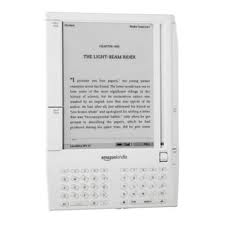 If you have a older, pre-2012 Kindle that you haven’t updated recently, Amazon is letting customers know that it’s time to do something about that.
This morning, I received an email from Amazon reminding me that I have devices that need to be updated. Now I am being told that unless I update them, I will no longer be able to “continue downloading e-books and using Kindle services.”
According to the email,
If you do not update the devices’ software by March 22, 2016, you will no longer be able to access Kindle services or get the update via Wi-Fi or a wireless connection. To resume access, you will need to manually update the software on each of your Kindle devices.
Note that you WILL still be able to update your Kindle after that date. You will just need to manually download and install the update.
The frustrating thing about the email is that it doesn’t indicate which Kindles need the update. I have two first-generation Kindles that I am not using right now. The devices are currently being stored with batteries removed until to decide what to do with them, so I assume that they are included. However, I also have a DX and Kindle Keyboard which I will now have to double-check to make sure they are up to date.
A lot of people have given or loaned older Kindles to family and friends. Since this is a critical update, you may need to check too make sure the devices are running the most recent version of the software. People who have modified or “jail-broken” their devices may have a problem going forward.
You can find instructions on how to update your particular Kindle model here. If you are not sure if you need to update, there are also links on the page for checking the software version for each model Kindle.
Did you get a notice to update?
Device Deals: Kindle, Fire, Nook and Kobo
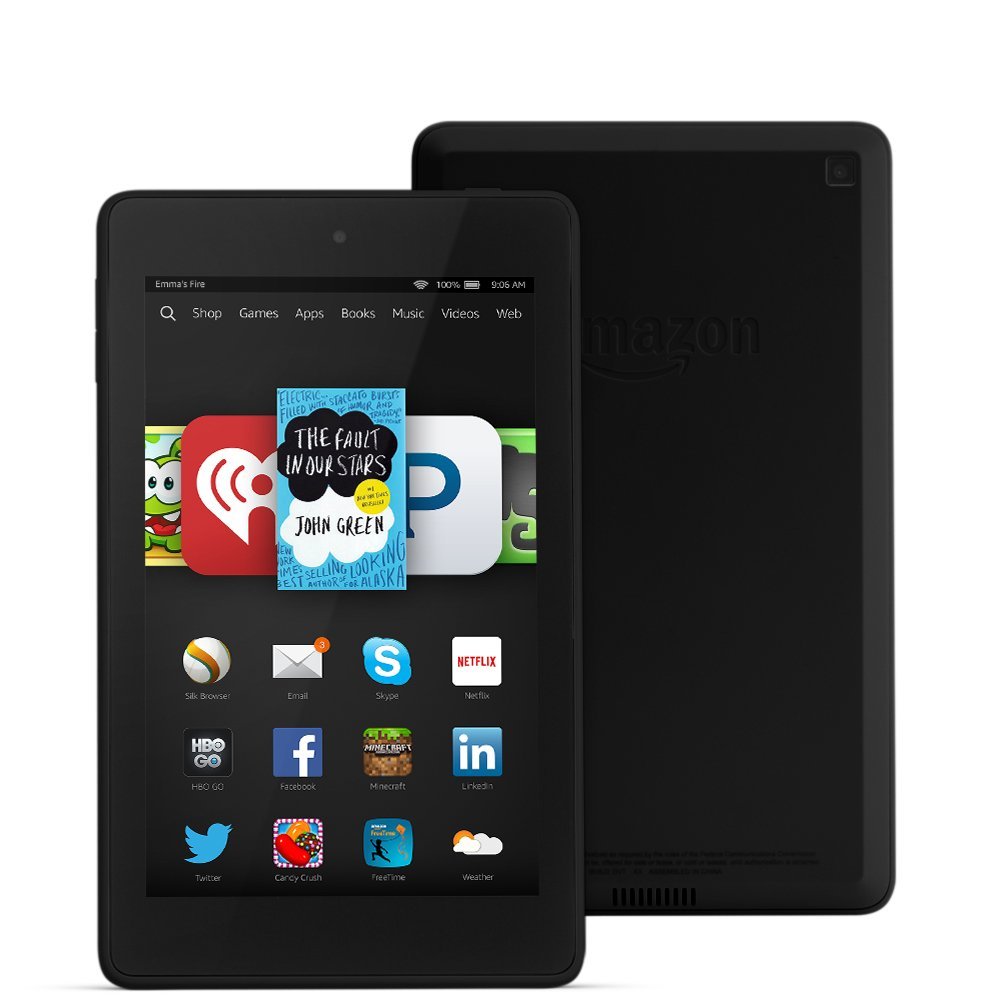 How about an e-reader for Valentine’s Day? Kindle, Nook and Kobo are all having special deals on devices just in time for gift-giving.
Amazon:
Until February 13, 2016, Amazon has all most of their Kindle and Fire devices on sale. Want a $40 Fire Tablet? A Kid’s Bundle? A new Paperwhite? Amazon is also featuring a number of bundles which include the device and the accessories together. All of these are available at reduced prices.
Barnes and Noble:
Do you have an old Nook that has seen better days? Barnes and Noble is offering you $50 towards a new Samsung Nook for you a trade-in on your old device. Offer is good until March 5, 2016 and terms and conditions apply. You can find more details here.
Kobo:
And, if you have been wanting a new Kobo ereader, this is the perfect time. Through February 14, 2016, you can get the Kobo Glo HD e-reader for just $109.99. Free delivery is included.
Which do you think is a better gift? A box of chocolates or an e-reader? 🙂
How do we define an e-reader?
 How do we define e-reader anymore? Or the term e-reading device? I ask this in all seriousness, because I think the way the terms are being used (or mis-used, as the case may be) creates a lot of confusion….
During CES2016, there was a lot of coverage about the new Samsung “Super Fridge.” The fridge featured cameras and a touchscreen and would allow you play music, stream TV, check if you are out of milk and even order groceries. Everybody was talking about this thing. It has been mocked and joked about on the Internet. This refrigerator is, in a way, both the poster child for everything the Internet of Things has the potential to be and, simultaneously, a symbol of status and decadence because of its expensive price tag.
Not surprisingly, shortly after the first announcement of this “Fridge of the future,” ebook blogs Teleread and The Digital Reader both asked the question, “Can you read books on it?” After, all isn’t that one of the first things we ebook lovers think of when we see shiny new electronic things?
Now, most people would probably agree that it is a stretch to call a refrigerator an e-reading device. But what about a phone? A lot of people read ebooks on their phone. So much so that I frequently see articles that refer to phones as e-reading devices. And this isn’t new.
It used to be that when someone referred to an e-reader, they meant a dedicated device, probably e-ink, that was used almost exclusively for reading ebooks. Over the last few years, that definition has gotten quite a bit looser. In 2014, I wrote a post questioning the appropriateness of calling an phone an e-reader. I wrote that piece when some article noted that apple had released a bunch of new e-readers. They were actually iPhones and iPads, not dedicated e-readers.
Please don’t get me wrong. Reading on cell phones has totally revolutionized the way we are able to read. But there is no getting around the fact that that device’s primary function is to be a phone, not an e-reader. The fact that it is capable of e-reading is definitely a bonus factor. But just because you CAN read ebooks on a device like a phone does not mean that we should call it an e-reader.
So what’s the problem with calling a phone or a an iPad or any other tablet an e-reading device? In my opinion, quite a bit.
Every few weeks, somebody writes a piece with a variation on a title like “Why print books are better than ebooks” or some such… Michael Hyatt’s Why I’m Putting ebooks on the Shelf for 2016 is one of the latest of these making the rounds. The problem with these pieces is that often, the points the article makes about ebooks really apply to a particular kind of device and not e-reading in general.
How many articles have you read that slam e-readers for the blue light or the backlight that keeps someone awake at night? What about all the distractions that keep you from reading or complaints how difficult it is to take notes on a device? Each one of those questions has a different answer, depending on the device we are reading on. But the fact that all of these attributes is linked to the generic term “e-reader” can cause a great deal of consumer confusion.
If you are extremely tech savvy, the distinction probably doesn’t matter. But if you are someone looking to purchase a device, believe me, the definition does matter. I can’t tell you how many conversations I have had with someone who says they are looking for an e-reader. When I question them about what they want to do with the device, it becomes quite clear that what they are really looking for is a tablet that they can also use to read ebooks.
As pundits begin to question whether the time has come and gone for dedicated e-readers like the Kindle or the Kobo or a Nook, I think the term e-reader may face even more scrutiny in the long run. Even as more and more people are reading ebooks, we are ultimately going to need to have a clearer terminology about just exactly what we call an e-reading device. It is made even more complicated by the fact that we don’t quite know what to call devices like the Nook Color, the Samsung Nook and the Kindle Fire. Are they e-readers because you can read on them? Are they tablets because they have apps? The terminology is confusing. If anything that we can read on becomes an e-reader, then how do we differentiate? It is a conversation we need to have.
And, as more and more devices become part of the Internet of Things and become both Internet enabled and digitally interactive, we are going to need new terms to define those objects as well, particularly in terms of ebooks and e-reading. Otherwise, life is going to get pretty confusing as more and more of our lives become digitally connected.
So here I am, thinking about that Super Fridge as the symbol of my e-reader definition problem. Not long ago in my post, Are you having a problem reading?, we talked, in passing, about the the concept of digital distraction. How distracting will this new refrigerator be if it streams my favorite episodes of Buffy the Vampire Slayer or plays my favorite Pandora station while I am cooking dinner? As a lifetime reader, I cannot tell you how many meals I have scorched, burned, or otherwise been forced to salvage somehow because I had my nose stuck in a book. To tell you the truth, I am not sure I would want a refrigerator I could read on in my kitchen. And when every device in my kitchen becomes an e-reader, I have a serious temptation problem.
Can you imagine the breakfast table of the future? There I’d be, waiting for somebody to update my cereal box and worrying that my ebook was getting soggy. Thanks, but no thanks.
How about you? How do you define e-reader?
What’s Your Old Kindle Worth? (Updated)

Amazon has a promotion going on encouraging you to trade in your old Kindle. It sounds pretty simple. You answer a few questions about your Kindle’s condition to get a trade in quote. Then, print the label and send it in. Amazon will verify the condition and apply a gift card to your account. You also receive a $20 discount good towards the purchase of a new Kindle, Kindle Paperwhite, Kindle Voyage or Kindle for Kids bundle.
You can trade in any of the following e-ink Kindles:
- 1st Generation Kindle
- Kindle 2nd Gen Free 3G
- Kindle 2nd Gen U.S. Wireless
- Kindle 5th Gen (black) Wi-Fi
- Kindle 4th Gen (graphite) Wi-Fi
- Kindle Touch Wi-Fi
- Kindle Touch Wi-Fi + 3G
- Kindle DX (white) 3G
- Kindle DX (white) U.S. Wireless
- Kindle DX (graphite) 3G
- Kindle Keyboard (white) Wi-Fi + 3G
- Kindle Keyboard (graphite) Wi-Fi
- Kindle Keyboard (graphite) Wi-Fi + 3G
- Kindle Paperwhite 6th Gen Wi-Fi
- Kindle Paperwhite 6th Gen Wi-Fi + 3G
- Kindle Paperwhite 5th Gen Wi-Fi
- Kindle Paperwhite 5th Gen Wi-Fi + 3G
Have a broken one? No worries. Even non-working Kindles are eligible for trade-in.
There are limitations, terms and conditions to the offer which expires on March 31, 2015*. You can find out more info here.
I have several working 1st generation Kindles I need to decide what to do with. This might be worth checking into as an option, although the last time I checked the trade in values, they weren’t offering a lot. I think it would be a no-brainer for a non-working device or one whose battery doesn’t hold a charge anymore. It is a great incentive to recycle or upgrade a device.
Are you interested in trading in your old Kindle towards a new one?
*Updated to add that I think this may be a misprint as the promotion just appeared, but I am checking with Amazon to verify.
*Update 2: I spoke to Kindle customer service and they assured me that this offer is indeed still valid. The CS rep I spoke to also thought that this was a typo (it is the first day of 2016) and that would be she would be initiating a support request for someone to check the web page copy.
*Update 3: The first date was a typo. This offer ends on March 31, 2016.
Prime Perks for Kindle and Fire Owners
 This year, my son finally asked for a e-ink Kindle. So, for Christmas, I bought him a Kindle Paperwhite and one of the $50 fire tablets. Since he is already a Prime Member (another gift from mom and dad), I wanted to fill him in on a couple of Prime benefits that only applied to device owners. Since this is the time of year when many people get Kindles for the first time, I thought I would share these with everyone.
Kindle Owners’ Lending Library (KOLL) allows Prime members to borrow one (1) book per month for free.
- Works on Kindle e-reader, Fire tablet, or Fire phone.
- Only available for device owners with memberships to Amazon Prime.
- Borrowed KOLL titles may also be shared with another adult in your household through Amazon Household and Family Library with select Prime memberships.
- Eligible books display the Prime logo. There are over 500,000 books in the lending library.
- Complete instructions with video are here.
A couple of important points here: First, there is no master “list” of book available to lend (the books actually change all the time). Secondly, you are not able to pick books from the web or the Kindle app. You also can only browse the Kindle store from your device to see which books are available to borrow. This tends to be a source of frustration for a lot of people, but it is the way the program works.
Kindle First is a program that offers customers early access to new Kindle books across popular genres from Amazon Publishing.
- Every month Prime members can choose one (1) of the books selected by Amazon’s editors for FREE.
- There are generally four to six books to choose from. These are books that will be released the following month.
- Kindle First books can be read on any Kindle device or free Kindle reading app and become part of customers’ permanent libraries.
- Prime invitees are not eligible for free downloads.
- Prime members can sign up to receive a monthly e-mail newsletter announcing new Kindle First picks.
- Kindle First on Amazon.com is available to US customers only.
- Complete instructions are here.
Unlike the Kindle Owners Lending Library, these titles can not be shared with other household members. Non-Prime members can usually purchase one of these titles for $1.99.
Over the years, these programs have been one of my favorite features for Kindle owners. I have read entire series that I would not ordinarily have bought. I have also read books that inspired me to go out an buy the entire series after reading the first book. It can be a great discovery tool.
The Kindle Owner’s Lending Library and the Kindle First programs are not meant to be a substitute for subscription services like Kindle Unlimited or Scribd. Rather, they should be thought of as an added Prime membership perk alongside the free shipping, video and music offered with the program.
 The eBook Evangelist