Library Corner: 11-4-2015

Library corner imageUS Library News:

San Diego Central Library To Expand Popular 3D Printer Lab (NBC San Diego)

Massachusetts Residents Now Have Borrowing Privileges From UMass Amherst Libraries, Select Materials Online and Pick Up at Local Library (Infodocket)

Hispanic heritage acquisitions: Constitutions of 19th-century Spain (Yale)

Harvard Law Library Readies Trove of Decisions for Digital Age (NYT)

Municipal Archives offer rare glimpse into NYC’s nearly 400-year history most people will never know (NY Daily News)

International Library News:

Vietnam: Ho Chi Minh City library attracts local youth with newly-opened Library 2.0 (TUOI TRE NEWS)

India, France Enter MoU On Digitization Of Old Manuscripts (iGovernment India)

Employees of raided Ukrainian library in Moscow say they were framed (Reuters)

Policy and Privacy:

Library Journal’s 2015 Survey of Library eBook Usage is Friendly to Self-Pub (The Digital Reader)

“Freedom on the Net 2015″ Report Released, Internet Freedom Declines For Fifth Consecutive Year (Infodocket)

Copyright:

PDF of Section 1201 Rule (Copyright.gov)

Reference and Statistics:

Monthly Climate Conditions – Interactive Map (Climate.gov)

Tracking Corporations’ Bad Behavior: Introducing Violation Tracker (Dirt Diggers Digest)

Ancestry Mexico Launches with more than 220 Million Searchable Mexican Historical Records (Ancestry.com)

New online tool reveals terrorist networks and behavior over time (START)

Second Half of Knoedler Gallery Stock Books Database Now Online (Getty Iris)

Digital Collections:

Zoom in to 9.3 Million Internet Archive Books and Images– through IIIF (Internet Archive)

The Iowa Review Launches Free Full Text Digital Archive & “Walt Whitman Quarterly Review Goes Open Access” (Infodocket)

Historypin Gets An Upgrade (Historypin)

American Archive of Public Broadcasting Launches Online Reading Room Making Historical Public Media Content Available to the Public (LOC)

Massive archive of Yukon aerial photos now online (CBC)

McGregor Library Offers Rare Digital History of the Americas (UVA)

About once a week, I post links to digital-related library news articles and information about digital collections available online.  I also post other links of interest about the digital life daily on the Google Plus eBook Evangelist Page.

CBS All Access Video Review (Updated)

CBS_blogI signed up for the CBS  All Access video service when they were running a promotion for a month-long free trial (no longer available). The service runs $5.99 a month. I tested the service on my Roku box, my Samsung Galaxy Note 8 tablet (Android) and my iPad Mini first generation (IOS).

Sign Up: 

Sign up was super easy. I just had to create an account, enter billing and credit card info and I was good to go.  I didn’t need to wait for a confirmation email to use the service.

Content:

CBS has a lot of long-running shows and  most of that content is available on the service.  NCIS and its spin-offs. Criminal Minds. MacGyver.  CSI and spin-offs. All 175 episodes of Family Ties. All 264 episodes of Frazier.  All of the Star Trek series are available on demand. The content also includes current shows and the option to watch live TV.

The few shows that were missing seemed to be tied in to current licensing deals. When I started my free trial, there were only clips  from the series EXTANT – no full episodes -Amazon had exclusive streaming rights to the show.  When season two of the show started, the season one episodes finally appeared on  ALL Access.  There are no season two episodes because Amazon still has exclusive rights to those.

CBS’ Elementary is another strange situation. Right now, seasons one through three are streaming exclusively on Hulu Plus.  CBS All Access is only showing episodes from season three on demand.  Hulu Plus’ original announcement seemed to indicate that its agreement for Elementary only covered past episodes, not the current ones.

Most new episodes appear the day after the show airs on television. The Kindle version of the app lists an 8 day delay for episodes in HD.

The Experience:

I tried the CBS app on three different devices. The experience was slightly different on each one of them, but the two things in common across all three platforms were the excessive adds and the video glitches and quality problems.

The advertisements on this service are, quite simply, awful.  There are tons of ads and they played before, during and after the show episodes. The sound volume of the ads was extremely loud compared to the video volume. The ad choices seemed especially irritating. The fact that they were played repeatedly through out an episode only increased my annoyance. The series of Jack Link’s Jerky commercials featuring the abuse and bullying of Sasquatch stood out as being particularly noxious.

On the Roku, ads played an average of every eight minutes.  The cutting process was really awkward. After the commercials, the show would replay the last few seconds before the break and playback would repeatedly stall and need to reload. I have DSL, and the app did not handle a slow connection well; at times the quality was very poor and the audio would be slightly out of sync.  This was especially noticeable compared to Netflix, Amazon and Hulu which seem to do a better job of balancing slower connections.

Viewing on the Android app showed most of the same problems with ads and audio sync issues as the Roku. For the most part, the video quality was somewhat better on the Android than the Roku box.

The picture quality on the iPad Mini was the best out of the three devices, although the audio sync problems were still there.The IOS app had full page ads built into the app that were really disruptive.

Both the Android and IOS app still showed a large number of commercials, but they seemed to be less frequent at the beginning  and more frequent towards the end of the episode.

All three platforms had closed captions, although the settings were a little more difficult to figure out on the Roku app as they worked a little differently than I was used to on Netflix, Amazon and Hulu. On the IOS app, I could turn on captions from within the app for streaming, but the app defaulted to the main IOS setting when watching live TV.

I live right outside of Chicago and had no problems with the app recognizing and streaming my local CBS station live. The commercial ads shown during the live didn’t seem the same ones I saw on the on demand side of the app. There were a lot of very short commercials but I didn’t see anything I recognized as strictly local to Chicago.

With a price tag of $5.99 a month, the advertisements and the poor video quality on the Roku box were deal breakers for me, especially after trying Hulu ad-free.  I canceled the service near the end of the trial.

Cancellation: 

Canceling the service was very easy. I simply clicked a link on my account page to cancel, although a toll-free number is also listed on the cancellation page. I was asked to give a reason for canceling (it was optional) and given an opportunity to  provide feedback (also optional). I received an immediate email verifying my billing cancellation. I was also informed that I still had access to the content until my trial period actually ended.

Today, CBS Studios announced a new Star Trek series to air in 2017. According to the announcement in Mediaite:

Unlike previous series, only the first episode will air on television. The new series will be the first exclusive series for CBS’s “All Access” online streaming service, which currently costs $5.99 per month.

I am a die-hard Trekkie, but unless this service gets significantly better,  I will be waiting on the new series until it is out on DVD. I don’t get making the show exclusive to All Access unless they are just trying to boost the adoption of the app.

So, how about you? Have you tried the service? How do you feel about CBS making it exclusive?

UPDATE: In today’s earnings call, CBS CEO Les Moonves is hinting at the possibility of an ad-free service for a higher price:

“How about $9.99 with no ads? It’s very possible,” he says although he adds that “it’s still very early.”

It is good that CBS is looking at a version without ads, but $9.99 for one network’s offerings seems a bit steep compared to Netflix, Amazon and Hulu Plus.

Library Corner 10-28-2015

Library corner imageUS Library News:

Media: Rovi Donates Nearly One Million CDs, Blu-Rays, DVDs, and Video Games to Michigan State University Libraries (Infodocket)

Ohio: KnowItNow24x7 Service Ends December 31 (State Library of Ohio)

Grant to Develop the Next Generation Wayback Machine (Internet Archive)

Seattle: Survey: Thumbs down on proposed Seattle Public Library name change (Seattle Times)

Gabriel García Márquez Archive Opens for Research on October 21 (University of Texas at Austin)

International Library News:

New Zealand: National library duped by $75k forgery (TVNZ)

Spain: National Library of Spain Announces 5 Million Euros ($5.6 Million) Digital Preservation Partnership (Infodocket)

Policy and Privacy:

Reinventing the Library (NYT)

The Ebook Pricing Wars: A former publisher’s perspective (American Libraries)

The future of encryption (National Science Foundation)

Copyright:

What the Google Books Victory Means for Readers: Is a universal library finally within reach? (The Atlantic)

Reference and Statistics:

Data: Statistics on U.S. Driver Electronic Device Use 2014 (Texting While Driving, Etc.) (Infodocket)

New African mining law database promotes transparency and investment (Mining Review)

Digital Collections:

Science: New NASA Website Provides Daily Views of Earth Taken From One Million Miles Away (Infodocket)

New Primary Source Sets for Education (DPLA)

NASA: Access Near Real Time Satellite Imagery using The Earth Observatory Natural Event Tracker (EONET), Version 2 of API Released (Infodocket)

Library of Congress Places Lomax Kentucky Recordings at Berea College (Berea College)

ANS Launches Online Catalog with Egyptian National Library (Coinweek)

About once a week, I post links to digital-related library news articles and information about digital collections available online.  I also post other links of interest about the digital life daily on the Google Plus eBook Evangelist Page.

Daily Links: The sorry state of ebooks on Windows 10 Mobile

daily_links_1A few fascinating links today:

The sorry state of ebooks on Windows 10 Mobile (Win Beta) – Interest piece on the state of ebooks for Windows phones and tablets.

Why your phone number isn’t going anywhere (The Next Web) – We now verify our identities using our phones. Here are some thoughts on what the future looks line.

First ever online-only NFL game draws over 15 million viewers (Ars Technica) – When we think watching football, we think television. Is this the beginning of a paradigm shift?

My Kindle find today: The Forever War by Joe Haldeman for only $1.99! (This book normally runs $5 to $8 for the ebook version.) You can also grab it on Barnes and Noble and Kobo for the sale price. Sorry, IOS users, but I can’t seem to find it on in the US  iTunes store. 🙂

Daily Links are interesting links I discover as I go about my online day. The frequency and number of links posted depend upon the daily news. I also post other, different links of interest on the Google Plus eBook Evangelist Page.

How to check your Amazon No Rush shipping credits

nrshipping1Many people know that Amazon frequently offers a credit for Prime members who choose no rush shipping for deliveries.  The offers tend to vary: The promotional credit might be for Amazon video, MP3 music or Kindle books. Video, as well as software and games credits are occasionally offered. Sometimes, the credit is for $1 or $2; other times, a $5.99 Prime Pantry shipping benefit is offered instead. When an eligible order is placed, Amazon sends an email noting the credit and the expiration date for getting the promotional discount.

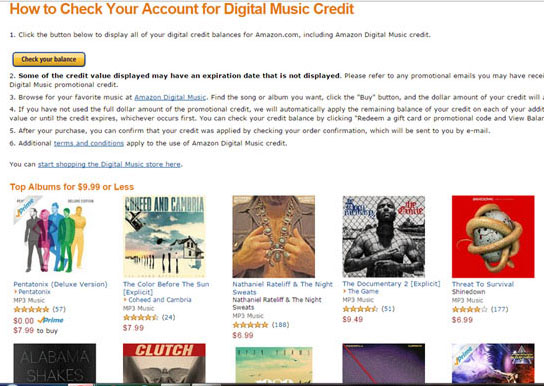
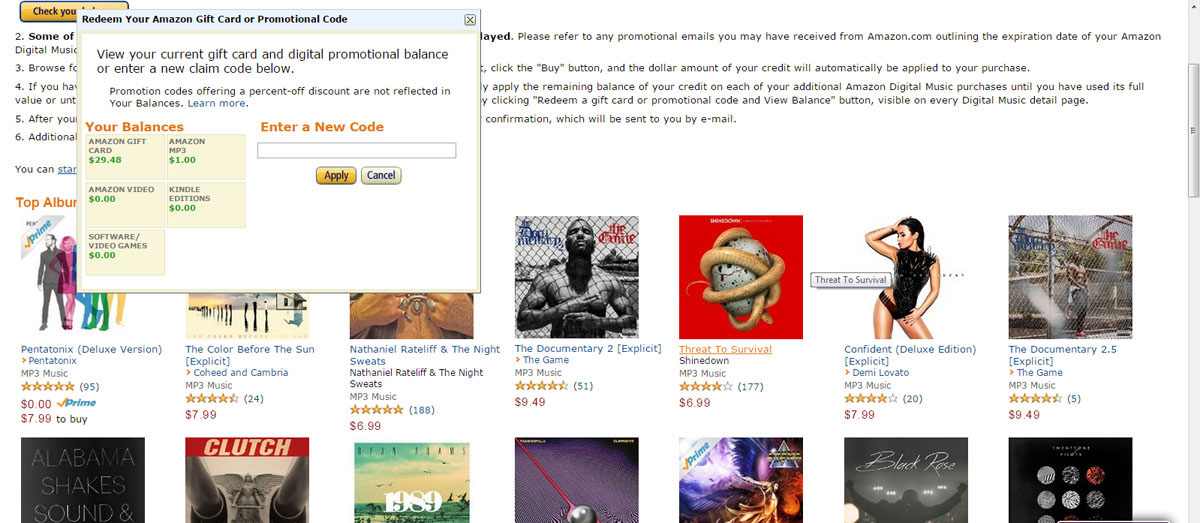
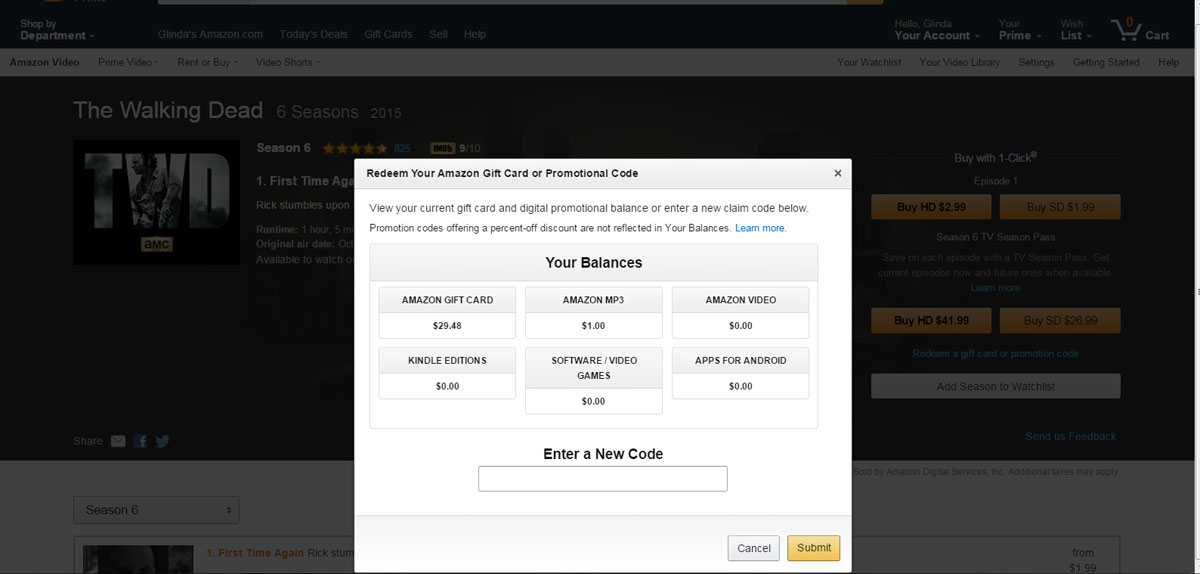
But did you know that there is a way to check the amount of unused credits you have remaining on your account? Buried in the digital music section, Amazon has a page where you can go to check the unused credits on your account. When you click to check your balance, a pop-up opens with a  breakdown of the balances for eligible products: Amazon gift cards, MP3s, Kindle books, Amazon Video, software and games:

nrbalances

(Click photos to enlarge)

What the page does not list are the expiration dates of the credits themselves. The site advises that you check the original promotion emails for the expiration dates. This page shows all of your available credits except for Appstore credits.

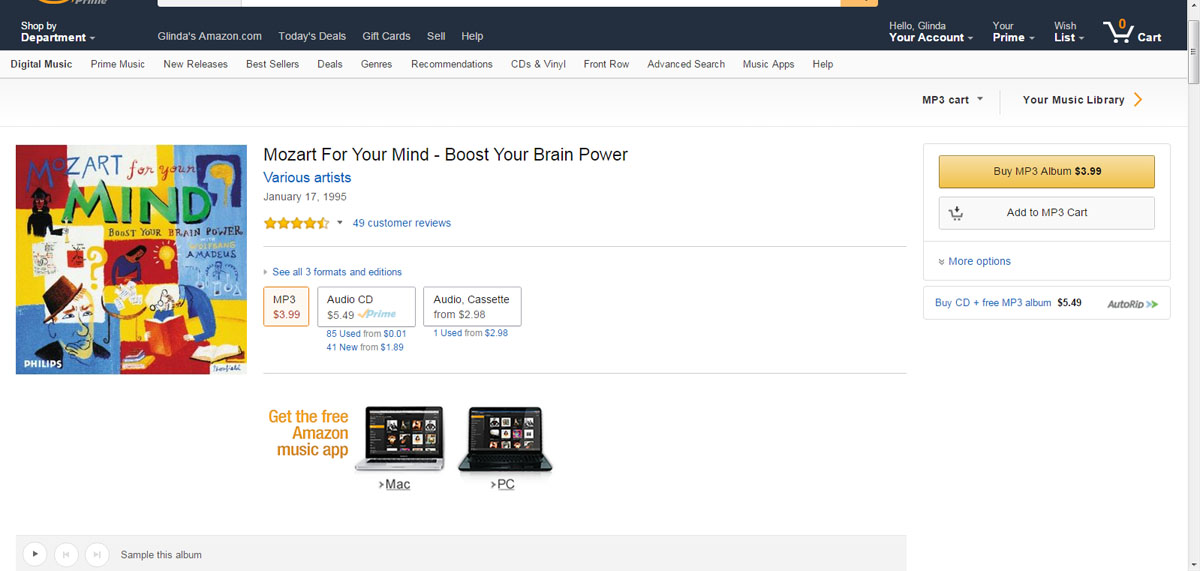
Interestingly, when I had previously looked in the past, I had not been able to find this information. But according to the page itself, it says I should be able to check the account credit balance on any Digital Music detail page by clicking the “Redeem a gift card or promotional code and View Balance” button. To check, I went to the detail page for Mozart For Your Mind – Boost Your Brain Power.  As you can see in the picture below, on my current version of Amazon, I don’t have a link or a button with that label. Instead, on the right side of the item detail page, there is a box under the buy button that says more options. Without being told, I would have no idea to look there to check my balance.

nrmozart0

Clicking on the more options button reveals further choices, including  “Add a gift or promotion code” instead of the  “Redeem a gift card or promotional code” link I was looking for.  The check balance part of the label is missing entirely. Once again, I would have no idea to look there if I wanted to check my balance without being told.

NRmozart1

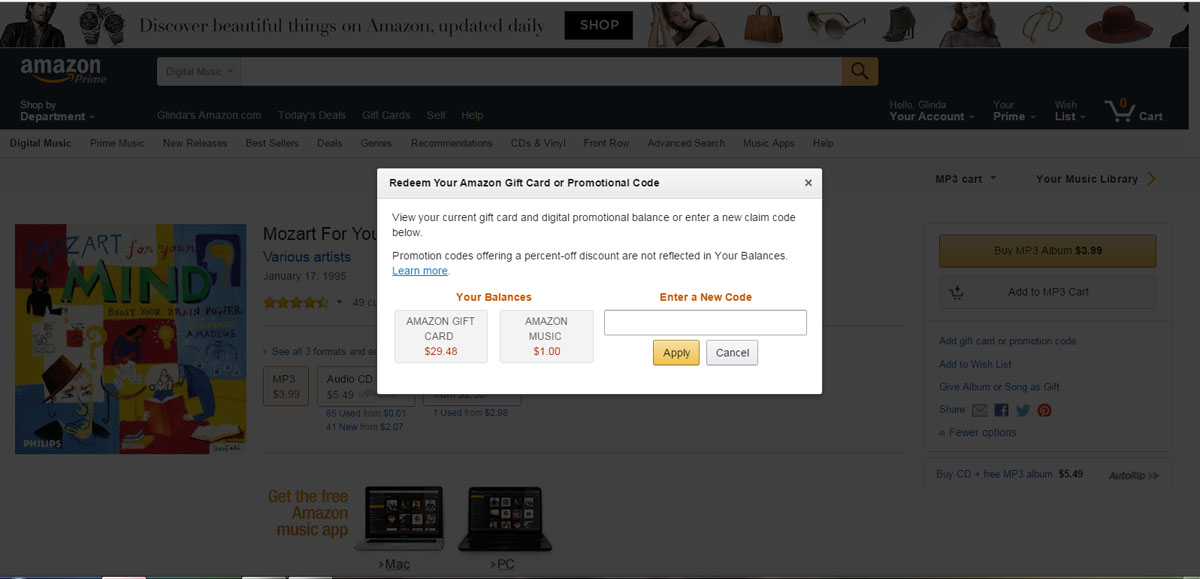
If you click on the “Add a gift or promotion code” link, the following pop-up screen appears:

nrmozart2

I was then offered a choice of using my gift card balance or my MP3 credit. No other balances are shown to me.

Checking for video credits was a completely different process. I tested it on the detail page for an episode of The Walking Dead. Underneath the buy buttons, this page did have a link that was worded “Redeem a gift card or promotional code.” Clicking on the link revealed a different pop-up which included the addition of Apps for Android credits, as seen in the picture below:

nrwd1

Strangely, the video page is the only one that shows all your various available credits in one place.

Checking the ebook and software item pages revealed no way of checking credit balances. (I don’t know if it made a difference that I had no existing credits in those categories.) The ebooks detail page had a “Enter a promotion or gift code” link buried under the “Add to Wishlist ” button and the choices available were only either to enter a promotion Code or an Amazon Gift Card.  None of the software detail pages had a button or link to add or redeem a code of any kind nor a way to check a credit balance.

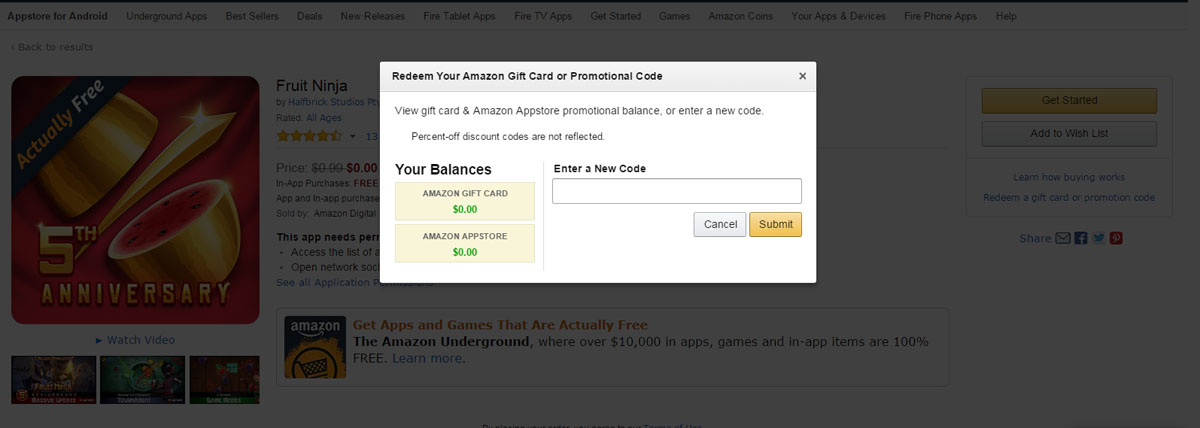
The App store detail page was again different from the previous pages. (I don’t think that it is technically a part of the No Rush shipping credit program – or at least I have never seen it. All my past app credits have been tied to other Appstore purchases.) Clicking the “Redeem a gift card or promotional code” link on this page only yielded two choices, a gift card balance or an Appstore credit.

nrapp

So, it seems that while there are several ways of reviewing your credits, the easiest, most straightforward way of checking the credits is the page designated for checking the account.

As a Prime member, I am a huge fan of the No Rush shipping credits. I can get extras for things that I am already buying. But, personally, I have had unused credits expire on more than one occasion because I forgot I had them. I was delighted to figure out to check my credits. 🙂

Daily Links: New Library Thing IOS app and lifetime memberships

daily_links_1LibraryThing App! (LibraryThing) – There’s a new IOS app and free lifetime memberships! And, before you ask, no, there is no Android app yet.

Lawsuit Claims B&N Knew it Was Selling Defective USB Cables (The Digital Reader) – I personally got a defective cable, so this is really no surprise….

Publishers Straddle the Apple-Google, App-Web Divide (NYT) – Interesting post. This highlights one of the most frustrating areas of the digital life.

How to rename your Kindles and edit their email addresses to make document sending easier (Teleread) – Helpful info, especially if you have multiple devices.

Three day sale on select Kindle models – $20 off on Kindles, Paperwhites and Kindle for Kids bundles. The prices are good until October 21, 2015.

My Kindle find today: Pirate Latitudes by Michael Crichton for only 99 cents. The manuscript for this pirate novel was found in the authors papers and published posthumously.

Daily Links are interesting links I discover as I go about my online day. The frequency and number of links posted depend upon the daily news. I also post other, different links of interest on the Google Plus eBook Evangelist Page.

3 day sale on select Kindle ereaders

kindle4kidsAmazon is running a three day sale on select Kindle devices. From October 19 to October 21, Amazon is offering $20 off three of its e-ink Kindle models. The Kindle models on sale are:

Kindle, 6″ Touchscreen with Wi-Fi – Includes Special Offers – This is the basic, entry level model Kindle. The touch screen is E Ink Pearl™, 167 ppi resolution with a 16-level gray scale. Four GB onboard storage.There is no built in light. Normally $79, the device is on sale for $59.

Kindle Paperwhite, 6″ with Built-in Light, Wi-Fi and Special Offers –  The Paperwhite has a built in light, a high resolution 300 ppi display, exclusive Bookerly font and 16-level gray scale. Four GB onboard storage.Normally $119,  the ereader is on sale for $99.

Kindle for Kids Bundle with the latest Kindle, Accident Protection, and Kid-Friendly Cover – This bundle includes the latest basic Kindle , 2 year accident protection warranty and a special kid-friendly case in your choice of Black,Blue, Green, Pink or Purple. Four GB onboard storage. There are NO sponsored screensavers on this model, making it a great buy for adults as well as children. Normally $99, the bundle is on sale for $79.

This is a good time to buy for Holiday gifts.

Daily Links: Why Twitter is Dying

daily_links_1A few links worthy of sharing:

Why Twitter is Dying and What You Can Learn From It (Medium) – Thought-provoking piece about online abuse and its effects.

Appeals Court Rules That Google Book Scanning is Fair Use (Ars Technica) – This case filed by the Authors’ Guild may finally be running out of steam….

Chrome dumps “OK Google” eavesdropping extension because nobody actually uses it (Ars Technica) – The “always on” extension is removed from laptops and desktops.

Here’s Warner/Chappell’s Plan to Save the “Happy Birthday” Copyright (Hollywood Reporter) – With so much money on the table, this story seems determined not to go away anytime soon.

Kindle Daily Deals (Amazon) – Nine books for $2.99 or less that include several of Robert Goldsborough’s re-boot of the Nero Wolfe Mysteries.

Daily Links are interesting links I discover as I go about my online day. The frequency and number of links posted depend upon the daily news. I also post other, different links of interest on the Google Plus eBook Evangelist Page.

Daily Links: The Internet in Cuba

daily_links_1I found a few links worth sharing today:

HAVANA’S HOTSPOTS: Cuba is coming online, but who will control its internet? (The Verge) – This is a fascinating article from The Verge on the state of Internet access in today’s Cuba.

Windows 10 upgrade installing automatically on some Windows 7, 8 systems (Ars Technica) – One of my Win 7 systems tried to do this today, so this is a timely piece.

YouTube Starts Selling Subscriptions — For Its Gaming Channels (ReCode) – Rumors have been rampant about YouTube starting their subscription service. Is this it?

Halloween Kindle Book Deals for $2 (Amazon) – A selection of mysteries, thrillers and some scary stories. for $2 each.  Sales prices are good through October 31, 2015.

Daily Links are interesting links I discover as I go about my online day. The frequency and number of links posted depend upon the daily news. I also post other, different links of interest on the Google Plus eBook Evangelist Page.