Please note: This article assumes you have already registered your device to your account and set up your wi-fi connection. Unless otherwise noted, these tips apply to Kindles, NOOK and Kobo readers.
1. Get a Cover
New eReader owners frequently ask, “Do I really need a cover?”
The answer is yes, you do. Really. Or a sleeve. Or a zippered pouch. But you do need something to protect the investment you’ve just made in your eReader. The screens can crack and eReaders do get dropped, stepped on and worse.
As far as covers go, there are lots of choices. There are covers with lights like the Amazon Lighted Cover. There are handcrafted leather covers like those from Oberon Design. You can also get sleeves and pouches. Prices range from $10 to $100, depending on size, style and material. Most are in the $30 to $75 range.
You can purchase covers anywhere eReaders are sold (including eBay). Craft sites like Etsy.com offer a variety of unique, handcrafted, one-of-a-kind covers. And if your talents run in that direction, you can find patterns and directions for DIY covers on many eReader message boards and forums.
2. Leave the eReader plugged in
Yes, I know. The ad for your eReader said that you could read for weeks on a single battery charge. And that is absolutely true. But those figures are just for reading. That’s not accounting for downloading and indexing.
Most eReader instructions are pretty clear about letting you know that you should keep the Wi-Fi turned OFF when you’re not downloading if you want to get the maximum battery life.
What they don’t tell you is that when you first start putting books on your device, it starts indexing the books so that they are searchable. This indexing causes a huge drain on the battery. If you are a frequent book buyer or you are loading your reader up for a trip, you are going to need to recharge more frequently unless you keep it plugged in when not in use. (That applies to sideloading books as well – they still need to index.)
(And FYI, if you have one of the $79 Kindles with Special Offers, that particular model has a shorter battery life than some of the other Kindle models. Be prepared to charge more frequently.)
3. Re-read a favorite for your first book
Imagine that someone handed you a book. You are reading along, totally engrossed in the story, until it is time to turn the page– but you don’t know how to do that. Purchasing a beloved favorite as your first book gives you a comfortable book that allows you to concentrate on learning to work the device. For example, the first book I bought for my very first Kindle was Anne McCaffrey’s The Dragonriders of Pern.
That technique can help when learning a new model of the Kindle as well. When I first got the new Kindle Touch, it was so different from the older Kindle models, it took me a bit to figure out how to use the device. I was used to buttons, and when I was trying to use the swipe technique to tun the page and wound up advancing 10 pages. My husband, who had never used a regular Kindle, had no problems at all with the Touch. So, sometimes, even an experienced user needs to spend some time with a new reader.
4. Send it to the cloud
You do not have to wait for your Kindle, Nook or Kobo to arrive to buy books. You can purchase and send books to the cloud before your device even arrives. On the Nook and the Kobo, the books go to your online library and then you download to the device (or app) or your choice.
On the Kindle, purchases made before your eReader arrives will be in your archive and then appear on your device once you register it. If you have more than one Kindle, you must choose which one you’d like to send the book to when you purchase the book.
But what if you want to keep your Kindle home page uncluttered? There is a way that you can send them to the cloud and not have them taking up memory on your device. Here’s how to use the feature:
- On the right side of the screen, choose Transfer via Computer from the drop down box.
- Click Buy Now with 1-Click.
- If you have more than one Kindle, a screen will ask you what Kindle you plan to transfer the book to. Since you aren’t actually going to transfer the book, it doesn’t matter what you choose. Click continue.
- A thank you screen appears:
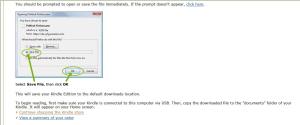
If a dialog box opens prompting you to save, click cancel. Otherwise, click the continue shopping in the Kindle store link.
5. Try a sample
Buying digital books is a bit different than going to a bookstore. Since you can’t thumb through the book, instead, you have the opportunity to download a sample of the book to your device. The Send a Sample dialog box is on the right side of the purchase screen, underneath the purchase box.
Samples vary in length up to about 10% of the length of the book, so shorter books have shorter samples. Most are usually about a chapter or so. This gives you the opportunity to try the book before you buy it. If you like it, you can buy the book from within the sample.
6. Gift cards and budgets
One thing that eReaders do is make it easy to buy books! If you want to keep yourself on track with a budget, try this tip: Purchase a gift card for yourself and redeem it. Then, when you make purchases, your account balance is used first. This allows you to set (and hopefully stick to) a budget for book buying.
7. Returning a book
Understand each vendor’s eReader return policy: Barnes and Noble’s website gives a 14-day window for returning an eReader. Amazon and Kobo have a 30 day return period on devices purchased from them. For all vendors, check with customer service for restrictions and any applicable re-stocking fees. Ereaders purchased at local stores are subject to store return policies.
Returning ebooks: I could not find a stated ebook return policy on either Kobo.com or Barnesandnoble.com. Amazon gives readers 7 days to return an ebook, although I have seen anecdotal evidence that customers who constantly abuse this feature have been contacted by Amazon about their behavior.
8. Need a little help?
Your eReader manual, customer support and the company’s website should answer many of questions about your new eReader.
Each eReader also has books available for purchase that can further your understanding of you device. For example, for the Kobo, there is the Kobo Touch Survival Guide (ironically available also in a Kindle version as well as one for the NOOK,) There are guides for NOOKs and for the Kindles.
9. Find a community
If you want to learn more about your device or simply to discuss ideas with other users, there are a number of forums dedicated to eReaders. Here are just a few:
Most boards have a section for people with other brands of readers. The boards are also a good source of information when looking for accessories.
Mobileread forums are intended for users of many different types of device and the discussion covers a wide variety of subjects. It is a great resource for recommendations and help on ebook format conversion and other advanced topics
10. Check out the freebies and bargains
I have written pieces on where to find legal free books for eReaders. You can read that article here.
If you are looking specifically for free books for one of the Kindles, Amazon does a list of the top 100 paid books and the top 100 free books here.
Another good source for Kindle books is Amazon’s Kindle message forum. Since Amazon created its Kindle Owners Lending Library for Prime members, there has been an average of 250 to 400 free books offered per day. Look for a discussion in the Kindle forum marked FREE BOOKS and the date (like this example). There, you will find links to various free titles. And remember to always check the price before you purchase some books are free only for a very limited time!
Amazon also offers a Kindle Daily Deal, where one book is featured at a discount price for that day only.
You can more resources for new ereaders and tablets on the New e-reader? Start Here page.
 Daily Links for day, March 13, 2016:


 today include mysteries, romance and biographies as well as science fiction and children’s titles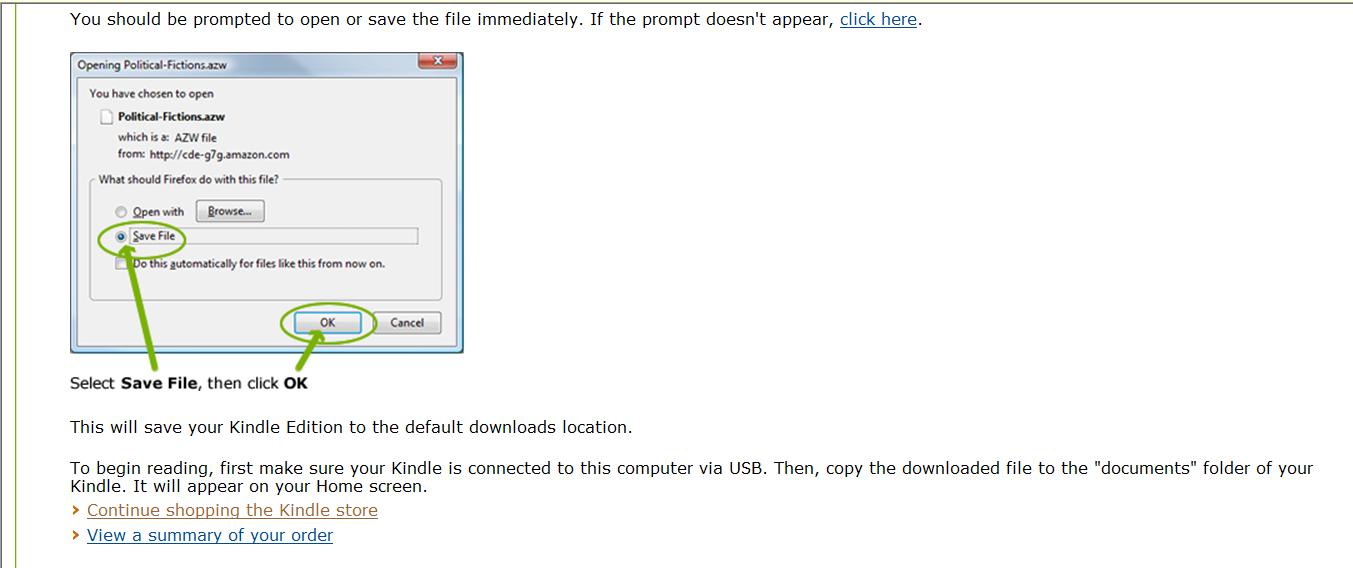
 The eBook Evangelist