Will a Nook Glowlight case fit the new Kindle Fire 6 inch?

javoedge6vintageI am still sorting through all the info on the new Kindle offerings to evaluate the specs and decide which one(s) I want. Amazon has given us lots of choices and I even got an email first thing this morning reminding me of certified refurbished Kindle Fire offerings.

So far, I  am most interested in  ordered the new Fire HD 6″ tablet. It looks like a great size to fit in a purse for use on the go. My problem is that I don’t like to use devices without covers and I also don’t want to spend nearly $30-$40 for an official Amazon case. I am fussy about cases and didn’t like the Amazon case  I bought for the Fire HD 8.9. I have usually used third-party cases on my Kindles, beginning with my first Oberon case for the Kindle 1. However, this is a non-standard size tablet and it seems there is nothing available to fit, at least, not yet.

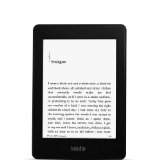
Checking the measurements for the new device and looking for a workaround, I took a look at my current case for my NooK Glowlight. Made by Javoedge, the case looks like it might fit, given its size and the way that it is made.

The JAVOedge 6″ Universal eReader Book Case is described as a universal case, designed to fit the Nook Glowlight, Kindle Paperwhite, Kobo glo, Kobo Aura, Kobo Touch, and the Kindle. It comes in a variety of patterns, including one with a metallic finish.

Pros of the case are lightweight, flexibility in sizing due to the loops holding the device in place and the way it is constructed.The price is a distinct advantage as it is $14.99 versus $30-$40 for the Amazon brand case.

There are a couple of downsides to the case. One is the fact that there is no sleepcover function with this case (or not one that works on my Kindle Paperwhite). Another is the quality of the case. It seems like it is essentially covered cardboard, slightly lighter than that of a hardcover book.  And, because it is designed for an e-reader, it does not have the ability to be used as a stand for normal tablet use.

I have not had any problems at all with the one I use for my Nook Glowlight. I have a one with a cute owl pattern. Yes, I am a cover junkie! 🙂

I have no doubt that one the new Kindle Fires start shipping, we will quickly see new covers for the six inch Fire available on the market. While I don’t think that this is a cover I would want to use long-term (it is not, after all, really designed for tablet use), I intend to try it as a short term solution until new covers are available. Note that I do have other devices (Kindles and Nooks) that will fit this cover, so it is not much of a risk for me to try.

This isn’t the first time I have done this. When the original Kindle Fire came out in 2010, I used the faux lether cover that came with my Kindle 1 for the Fire  until I could find something I liked.

Updated: The answer to will the case fit an HD 6 is no. The case is too wide to safely hold the device. I talk about this in my review of the Fire HD 6.
New Kindles are confirmed and up for pre-order

kindle_voyageAmazon now has the new lines of Kindles and Kindle Fire tablets up for pre-order. I am still sorting through the info, but here are the links to learn more about the new models:

  • The new basic Kindle with touch screen. The price has also increased by $10 over the previous model.
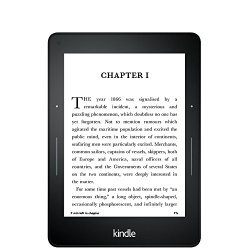
  • The brand new Kindle Voyage, with improved screen resolution (300 ppi), an intelligent frontlight with brightness sensor and a physical page turn  method called “PagePress.”
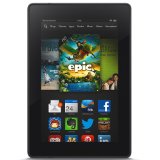
  • The new Fire HD 6,  a slightly smaller, six inch tablet that will retail for only $99 (with special offers).
  • The new Fire HD 7, starting at $139 (with special offers).
  • The Fire HD Kids Edition, 6″ or 7″ HD Display,  with a blue kid-proof case, your choice of sizes, starting at $149.
  • The new Fire HDX 8.9, lighter and with a faster processor, starting at $379 (with special offers).

Amazon is also rolling out a new Fire OS called Sangria with new, updated features which include individual emails and profiles for family members. Both the Fires and the E-ink Kindles will also be getting a new feature  called Family Library which will allow family members to share books and videos on an account. This is a feature that I have personally wanted for a long time!

I’ll have more to come on the new devices and features! 🙂


Is Kindle Unlimited worth the price?

Amazon has introduced the Kindle Unlimited (KU for short) subscription service and it seems to have created quite a buzz.

KU_tcg_470x200._V349150858_

It offers unlimited access to over 600,000 Kindle books and over 2,000 audiobooks with Whispersync for Voice. You can keep up to ten books at a time and there are no due dates. You can read your Kindle Unlimited books on any Kindle device or any of free Kindle reading apps.

For new subscribers, there is a free 30-day trial. That also includes a free Audible membership for up to three months. The Kindle Unlimited subscription includes 3 free Audible books (even if you are already a subscriber).

  • If you like to own books
  • If you like to read bestsellers
  • If you read very few indie published books
  • If you only read a few books every month
  • If you read mostly free books or classics
  • If you mostly buy books on sale
  • You already have an Audible membership
  • If you are already a Prime member and satisfied with one free book rental per month.

In that case, Kindle Unlimited may not be a good value for you.

The answer may be yes if the following is true:

  • If you need to read on e-ink only
  • If you read mostly indie authors
  • If you read lots of short stories and short non-fiction books
  • If you want more than one book per month from KOLL
  • If you don’t have an actual Kindle or Kindle Fire device (read on app, tablet, computer or phone)
  • If you use Whispersync to switch back and forth with audio for a lot of books
  • If you do not re-read books or do not want to own every book you read.
  • If you spend a lot each month on books that are also in the KOLL Library.

But what if you find that points from both lists apply to your situation?

First, browse or search available books  to see the offerings.

Compare the list of books in the KU program to to your Wishlist or TBR (To Be Read) list.

If you already subscribe to Scribd or Oyster, compare the lists of available books on those services to see which one offers you the most value.

Lastly, tale a look at your monthly book budget, your spending history and what types of book you are reading to see if the service is cost effective.

A case study:

I am going to use myself as a case study. 🙂 Here’s the background: I am an avid reader whose reading time is more constrained than I would like. I have both e-ink Kindles and Kindle Fire tablets. I like to own books and re-read favorites. I prefer to read on e-ink versus a tablet or phone.  I am already a Prime Member and also have an Audible membership. I rarely use Whispersync. I do have an Open Library membership. I also have a membership to Scribd (a gift), although not being able to use it on an e-ink device limits its usefulness for me – I haven’t yet finished one Scribd book.

Not including re-reads, I generally read 1-2 full length books per week (fiction and non-fiction). I also read serials, short stories and short non-fiction works. Since I only read e-books any more, I am replacing my print copies of old favorites with e-books. 

I like to read a variety of books.I read almost every kind of fiction, but primarily enjoy read classics, mysteries and thrillers, SF and horror. In non-fiction, I enjoy history, and anthropology, self-help, spirituality,motivational reading and how-to books. More than half of the authors I read are indies and small press titles. Many of the short stories, non-fiction booklets and new authors I read come from trying books that are offered for free. If I like them, I then generally buy new and backlist titles of the author’s works. I refuse to pay more than $9.99 for a license to read an e-book and pay close attention to sales like the Kindle Daily Deal and price reductions for bestseller and backlist purchases. I frequently try new authors via the KOLL library, but there are months that I actually forget to borrow my free book.

I went back and looked at my book purchases for the month of June. Most of the paid books I purchased last month are NOT available as part of the Kindle Unlimited service. Two of my June purchases, Dead Spots and Trail of Dead, were originally KOLL borrows that I liked so much I went back and purchased copies to own when they were on sale. Most of the free books I picked up that month were gardening books for my container gardening project that I probably would not have gotten if they weren’t free.

I concluded that, at least for me, I probably would not have saved any money in the program. Because I already have access to most of the books already (either through KOLL or as free promotional books), I feel that it is doubtful the Kindle Unlimited program would be worth the extra cost to me.

I do intend to look back over a few more months’ past purchases to see if that data looks any different. And, I intend to watch my purchases over the next few weeks to see if a perhaps a subscription might seem to be worthwhile. Being able to read on and e-ink device would be a big plus. After all, Amazon is offering a 30 day free trial, so I can always change my mind. 🙂

What about you? Is the Kindle Unlimited program attractive to you?

Refurbished Kindle Paperwhite $85 Deal of the Day

paperwhiteToday’s Kindle deal of the day is a Certified Refurbished Kindle Paperwhite (current generation) with special offers for only $85.00.

My Paperwhite has become my go to ereader. The front lit screen is easy to read on and is a very bright white when compared to the screens of the other Kindles or either one of my Nook e-ink ereaders. It is great for reading in bed without an external light! 🙂

Daily Links: Public Domain in the Digital Age

From BoingBoing, an interesting piece on the public domain in the digital age and the concept of copyfraud.

Open Culture has an article on the Speech Accent Archive – The English accents of people who speak 341 different languages.

Amazon has 31 apps for free today (Saturday) via the Amazon App Store.

And on Making Use Of, you will find game, productivity and musical apps are on sale or free for the iPad. Note that I found that some of the pricing did not apply when purchased through a device other than an iPad.

My E-book finds of the day are The Golem and the Jinni (P.S.) and The Secret Life of Pronouns: What Our Words Say About Us from my to-be-read list. They are each on sale today for only $1.99.

Daily Links are interesting links I discover as I go about my online day. The frequency and number of links posted depend upon the daily news.

Daily Links: Open Road launches series for controversial books

From Publishers Weekly: Open Road launches series for controversial books

From the eBookReader.com: Kobo Website formatting tip on how to identify ePub types

From Teleread: Opening Nook books in Adobe Digital Editions

From Vox (via the Digital Reader): 7 Things the most-highlighted passages from Kindles tell us

From the Digital Reader: Missing in Action: The Kindle Paperwhite 3

Today, Amazon has a Refurbished Kindle Fire HD 8.9 with 4G LTE  as the Bonus Deal of the Day. It is $199 for the 32GB version.This is the older version with the micro-HDMI port and the 4G coverage is set up for AT & T coverage.

Daily Links are interesting links I discover as I go about my online day. The frequency and number of links posted depend upon the daily news.

Your Oldest e-book Purchase Date

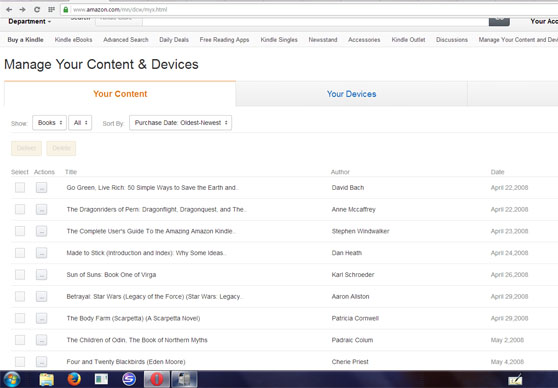
If you own a Kindle  ereader, you have probably noticed that Amazon has completely redesigned the Manage Your Kindle Page (now called Manage Your Content and Devices). If you had a large number of books, the old page was a nightmare to try to use. It showed titles newest first and would only show 10 books or so at a time before you had to go to the next page. And after few pages, the system would time out and you would have to log in again and start all over. It was pretty much impossible to see all your books if you had a large collection. Seeing your oldest e-books was something I never managed to figure out how to do.

myk web page

The new page, however, is quite different to use. While some customers haven’t been wild about the changes, many others enjoy the new feature offered by the redesign. (I personally love it!)  One of the new features is the ability to sort by your oldest books first. There is currently a thread on the KBoards forums discussing this very subject, asking folks to post the date and title of their first Kindle purchase.

My first two purchases on the Kindle were made April 22, 2008.  The first book downloaded was a free one, Go Green, Live Rich: 50 Simple Ways to Save the Earth and Get Rich Trying by David Bach and Hillary Rosner (now $11.64). The first paid purchase was the The Dragonriders of Pern Omnibus  by Anne McCaffrey for $7.96 (now priced at $9.99).

This walk down memory lane was fascinating for me. I can only go back 18 months on my NOOK books. Kobo lists my books, but give little data about them.  The page revealed a lot of interesting data about my e-book buying habits: what I bought and how much I paid for the books. I was buying 7 to 10 books a month for my Kindle, and that doesn’t count the classics I was downloading and reading from Project Gutenberg.

So, how about you? What was your first e-book?

Samsung partners with Nook for a new tablet

Today brings news that Samsung is partnering with Barnes and Noble on a new co-branded Nook Tablet that will be based on Samsung’s Galaxy Tab 4 model. The Galaxy Tab series is a popular line of tablets and new device is planned to build off incorporate the hardware and “provide customers “with easy access to Barnes & Noble’s expansive digital collection of more than three million books, leading magazines and newspapers.”

According to the press release:

The companies are expected to introduce Samsung Galaxy Tab 4 NOOK in a 7-inch version in the U.S. in early August. The co-branded tablets will be prominently displayed along with NOOK eReaders and sold at Barnes & Noble’s nearly 700 bookstores across the U.S. and online at bn.com, one of the leading e-commerce sites.

Barnes and Noble says it plans to continue to sell (and support) its Nook Glowlight.

There is no mention of what the co-branded tablet will be called. I will be interested in seeing how the tablet is differentiated from Samsung’s own Galaxy Tab series. I currently run the Nook reading app on a Samsung tablet and am also curious as to how the experience of using the new device will be different.


Did You Know: Quick Fix for a Frozen Screen

Here’s a quick fix for when your Kindle is running slow or freezes entirely:

  • Press (or slide) the power button and HOLD for 20 seconds.
  • After 20 seconds, release the power button.  (On the Kindle Fire, press the power button again.)
  • The Kindle start up screen will appear shortly.

Here are more troubleshooting tips,  with pictures, including a nifty timer to count down the seconds to hold down your power button. 🙂


Kindle Fire HD 8.9 with 4G LTE on sale

Kindle FireToday, Amazon’s Deal of the Day is a Certified Refurbished Kindle Fire HD 8.9″ with 4G LTE coverage for $80 off. It comes in both 32GB and 64 GB versions. I believe these were unavailable new the last time I looked into buying one….

Several caveats here:

  • Be aware that this is a refurbished product, although Amazon does give the same return policy and one year warranty that comes with a new Kindle Fire tablet.
  • The network carrier for the 4G LTE coverage is ONLY available through AT & T.  If you want to add a tablet to another carrier, this is not the right one for you. Check the coverage map for AT & T here.
  • The $49.95 promotional data plan originally offered with these is NO LONGER AVAILABLE.  Current AT & T data plan rates apply.