Kindles on sale for $49

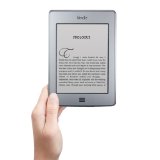
Basic KindleFor a limited time, Amazon has the basic Wi-fi Kindle with Special Offers  on sale for just $49. The Wi-fi Kindle Paperwhite with Special Offers  is on sale for $99. That’s a savings of $20 off the regular price.The Paperwhite without Special Offers is also on sale.

I own both of these and think that they are great devices. The ads are fairly unobtrusive (I actually like them better than the regular screensavers!). The Paperwhite has become the Kindle I use the most and with the built-in light for reading in bed (especially without disturbing your partner), it can’t be beat.

This is a great entry level price if you are thinking of trying the Kindle or if you want to take advantage of the many free books that are offered exclusively for the Kindle.

Managing Your Free Kindle Books, Part Two: Choosing Wisely and Pre-Organizing

This is the second in a three-part series. Part One is here. Most of the information in this series of posts is specific to the Kindle line of e-readers  and the Amazon bookstore.

In Part One, we looked at an overview of some of the problems that can be caused by having too many books on your Kindle or Kindle Fire. The same is true of the Kindle for PC app for your computer or mobile device. While this is just as true for paid books as it is for free ones, the nature of free tends to tempt us to overload our Kindles.

It is also interesting to note that even if a Kindle is not actually malfunctioning due to too many books (freezing, inability to download or highlight,etc.), many people find that as they get more and more books on their Kindles, the device runs much more slowly (slower page turns, slower search, etc.).

So how do we deal with this? The answer is not to avoid free books! There are some great bargains in the free offerings and I have discovered some tremendously gifted authors through their free books, authors such as Hugh Howey, Keith C. Blackmore,and many others.

What we can do is choose more wisely what books to put on our Kindle.  Why is this important? Because the best way to organize is not to put books (paid or free) on the Kindle in the first place that you are ultimately not going to read.  Think of it as pre-organizing and a way cut down on the Kindle clutter.

Keep lists of the books you want to read:  This is as simple and as old-fashioned as it gets. Write down the name of the title and the author. You can make this as low tech (pen and paper) or as high-tech (MS Word, Evernote or even Notepad for the Kindle) as you are comfortable with. Personally, I use Evernote and have a TBR note where I jot down the title and author, a link to a buy page or the review that first caught my eye. That way, I don’t forget about the book, but don’t have to download the sample to remember it. I can then check the book out at my leisure.

Recommendations:  Nowadays, the free books offered on any given day normally number in the hundreds. There are a lot of websites that list free books (EreaderIQ, Kindle Nation Daily, Books on the Knob, Pixel of Ink and many, many others). An internet search for free Kindle books will bring up pages of blogs and curated lists that can help you find books that interest you. Most of these sites give you the ability to search for books in certain categories and genres. Amazon lists the top 100 sellers, both free and paid.

Don’t have time to search through hundreds of free books to find what you like? There are also a lot of places you can get recommendations for free books without having  to sort through the listings. Most genre groups on social networking sites like GoodReads and Shelfari have a place on the message boards that is dedicated to free books of that particular genre.  And if you are looking for a particular author, check their blog, website or Twitter account: Most authors who offer their books for free on the Kindle let their fans know.

Read the reviews:  This is especially important for people who like to find books, then wait to find them free. Good, honest reviews can help you make a decision about whether to download a book or not. Yet, given some of the recent controversies over fake and purchased reviews, it can be difficult to know whether to trust them or not. If you are unsure, click on the reviewer’s name and check out the other ones that they have written.  Look for warning signs: all reviews for the same author, all five-star reviews, or if tis is the only item the person has ever reviewed. Ultimately, remember that reviews are simply the opinion of the person writing the review.

Read the samples: Often, reading the sample of the book can give you a clearer idea about whether you will like the book or not. Do you like the writer’s style and syntax? Are there grammar and spelling errors? The sample can give you an actual feel for the book.

With free books, however, you do not have the opportunity to send a sample to your Kindle or your app.  However, you can still read the sample on your computer by clicking on the Look Inside feature. And, using the feature means that’s one less sample cluttering up your Kindle. Here what it looks like for the The Man Cave Cookbook, which is free periodically.

Click=big

Sometimes, however, samples can cause as many problems as they solve. Some people have pages and pages of samples on their Kindles. Those samples take up space and memory and must be indexed, just like books. In other words, too many samples can cause the same problems as too many actual books!

Fortunately, there are several ways to help organize your samples.  One method is to send all your samples to one place. That can be your Kindle app on your computer or phone. That way, you can read a sample when you have a spare moment to read, but not enough time to get immersed in an entire book. If you have more than one Kindle, you can designate one for all your samples.

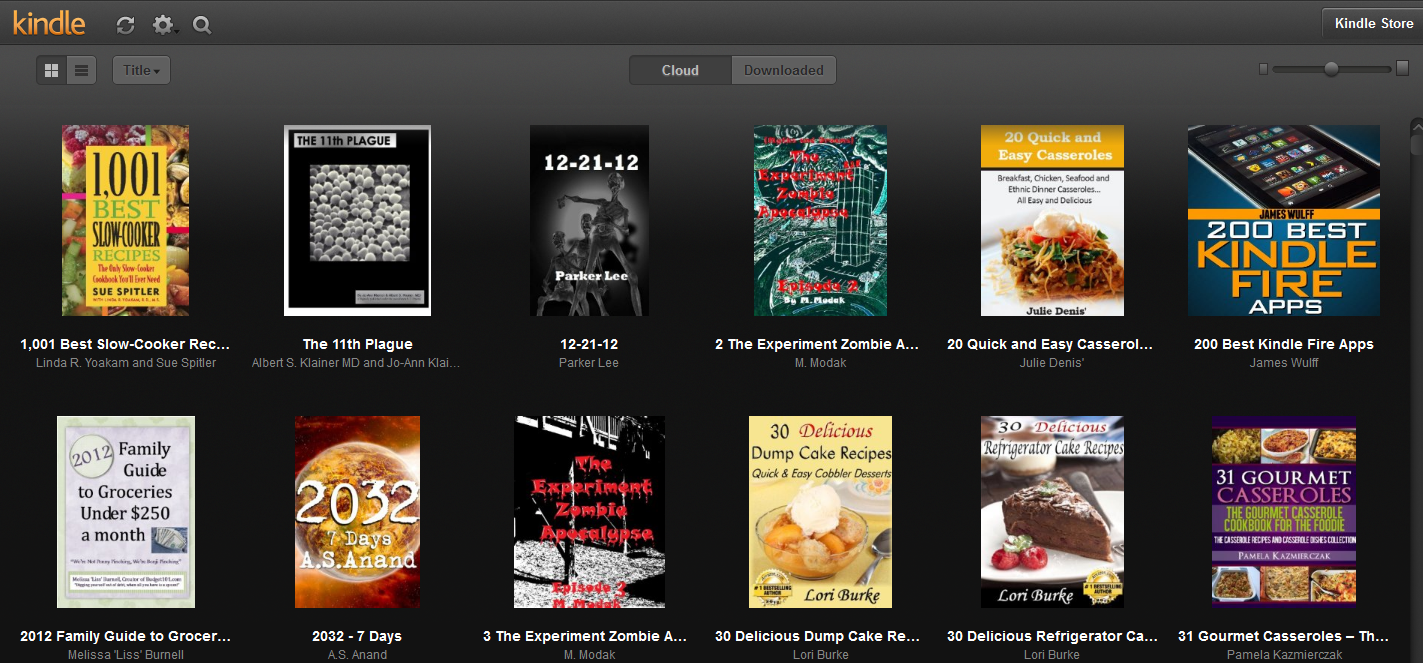
If you want to keep your Kindle totally uncluttered by samples,  you can send them to the Cloud Reader instead of your Kindle. As seen in the picture below, samples on the Cloud Reader show their covers, which can give you a visual jog to help you remember the book.

Click=big

In Part Three, we will discuss organizing your TBR pile, including more ways to organize books you haven’t even downloaded yet. Note: Due to a family emergency, part 3 was never written.

Penguin says users can’t sue

Paid Content is announcing that Kindle and NOOK users must accept arbitration instead of suing them in the pending class action lawsuits over ebook pricing. Penguin is using the rationale that users agreed to this in Amazon and Barnes and Noble’s terms of service for the ereader devices.
 
I am not a lawyer, but I don’t think the argument holds water. When the publishers put the agency model into effect, Amazon became their agent, not the other way around. Amazon even collected sales tax based on the publisher. It doesn’t make sense that the publisher can’t turn around and hide behind Amazon on this one.

International Kindle Touch WIFI

For my international friends (especially those in Canada and Australia who have been waiting for these) – I am hearing that the Kindle Touch WIFI is now available for shipment. There still has been no announcement from Amazon on the subject (even though I am seeing multiple blog entries about the product’s availability). When I go to the Kindle Touch page, I can’t see the international page as I am accessing it from the United States. 😦

I’ll let you know if that changes. If you see the international Touch available, please leave a comment and let me know!

Ed McBain 87th Precinct mysteries only 99 cents

I actually had quite a bit of interest in my blog entry announcing that Ed McBain’s books are now available for the Kindle. Well, today only, all 35 titles of the Ed McBain 87th Precinct mysteries are on sale for only 99 cents each! Normally, these are $4.99 each.

The deal ends tonight at midnight, PST.

I think I am going to buy them all…

Ten Tips for the New eReader Owner

Please note: This article assumes you have already registered your device to your account and set up your wi-fi connection. Unless otherwise noted, these tips apply to Kindles, NOOK and Kobo readers.

1. Get a Cover

New eReader owners frequently ask, “Do I really need a cover?”

The answer is yes, you do. Really. Or a sleeve. Or a zippered pouch. But you do need something to protect the investment you’ve just made in your eReader. The screens can crack and eReaders do get dropped, stepped on and worse.

As far as covers go, there are lots of choices.  There are covers with lights like the Amazon Lighted Cover.  There are handcrafted leather covers like those from Oberon Design. You can also get sleeves and pouches. Prices range from $10 to $100, depending on size, style and material. Most are in the $30 to $75 range.

You can purchase covers anywhere eReaders are sold (including eBay). Craft sites like Etsy.com offer a variety of unique, handcrafted, one-of-a-kind covers. And if your talents run in that direction, you can find patterns and directions for DIY covers on many eReader message boards and forums.

2. Leave the eReader plugged in

Yes, I know. The ad for your eReader said that you could read for weeks on a single battery charge. And that is absolutely true. But those figures are just for reading. That’s not accounting for downloading and indexing.

Most eReader instructions are pretty clear about letting you know that you should keep the Wi-Fi turned OFF when you’re not downloading if you want to get the maximum battery life.

What they don’t tell you is that when you first start putting books on your device, it starts indexing the books so that they are searchable. This indexing causes a huge drain on the battery.  If you are a frequent book buyer or you are loading your reader up for a trip, you are going to need to recharge more frequently unless you keep it plugged in when not in use. (That applies to sideloading books as well – they still need to index.)

(And FYI, if you have one of the $79 Kindles with Special Offers,  that particular model has a shorter battery life than some of the other Kindle models. Be prepared to charge more frequently.)

3. Re-read a favorite for your first book

Imagine that someone handed you a book. You are reading along, totally engrossed in the story, until it is time to turn the page– but you don’t know how to do that. Purchasing a beloved favorite as your first book gives you a comfortable book that allows you to concentrate on learning to work the device. For example, the first book I bought for my very first Kindle was Anne McCaffrey’s The Dragonriders of Pern. 

That technique can help when learning a new model of the Kindle as well. When I first got the new Kindle Touch, it was so different from the older Kindle models, it took me a bit to figure out how to use the device. I was used to buttons, and when I was trying to use the swipe technique to tun the page and wound up advancing 10 pages. My husband, who had never used a regular Kindle, had no problems at all with the Touch. So, sometimes, even an experienced user needs to spend some time with a new reader.

4. Send it to the cloud

You do not have to wait for your Kindle, Nook or Kobo to arrive to buy books. You can purchase and send books to the cloud before your device even arrives.  On the Nook and the Kobo, the books go to your online library and then you download to the device (or app) or your choice.

On the Kindle, purchases made before your eReader arrives will be in your archive and then appear on your device once you register it. If you have more than one Kindle, you must choose which one you’d like to send the book to when you purchase the book.

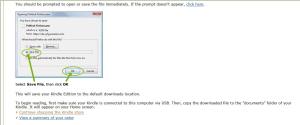
But what if you want to keep your Kindle home page uncluttered? There is a way that you can send them to the cloud and not have them taking up memory on your device. Here’s how to use the feature:

  • On the right side of the screen, choose Transfer via Computer from the drop down box.
  • Click Buy Now with 1-Click.
  • If you have more than one Kindle, a screen will ask you what Kindle you plan to transfer the book to. Since you aren’t actually going to transfer the book, it doesn’t matter what you choose. Click continue.
  • A thank you screen appears:

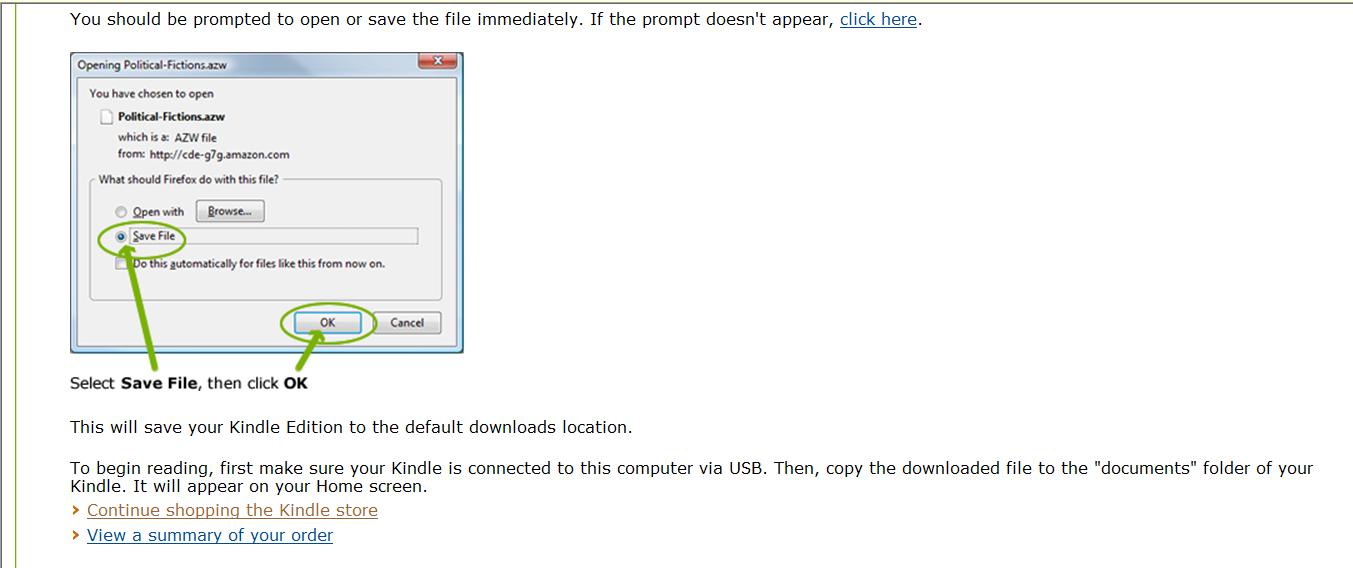
If a dialog box opens prompting you to save, click cancel. Otherwise, click the continue shopping in the Kindle store link.

5. Try a sample

Buying digital books is a bit different than going to a bookstore. Since you can’t thumb through the book, instead, you have the opportunity to download a sample of the book to your device. The Send a Sample dialog box is on the right side of the purchase screen, underneath the purchase box.

Samples vary in length up to about 10% of the length of the book, so shorter books have shorter samples. Most are usually about a chapter or so. This gives you the opportunity to try the book before you buy it. If you like it, you can buy the book from within the sample.

6. Gift cards and budgets

One thing that eReaders do is make it easy to buy books! If you want to keep yourself on track with a budget, try this tip: Purchase a gift card for yourself and redeem it. Then, when you make purchases,  your account  balance is used first. This allows you to set (and hopefully stick to) a budget for book buying.

7. Returning a book

Understand each vendor’s eReader return policy: Barnes and Noble’s website gives a 14-day window for returning an eReader. Amazon and Kobo have a 30 day return period on devices purchased from them. For all vendors, check with customer service for restrictions and any applicable re-stocking fees. Ereaders purchased at local stores are subject to store return policies.

Returning ebooks: I could not find a stated ebook return policy on either Kobo.com or Barnesandnoble.com. Amazon gives readers 7 days to return an ebook,  although I have seen anecdotal evidence that customers who constantly abuse this feature have been contacted by Amazon about their behavior.

8. Need a little help?

Your eReader manual, customer support and the company’s website should answer many of questions about your new eReader.

Each eReader also has books available for purchase that can further your understanding of you device. For example, for the Kobo, there is the Kobo Touch Survival Guide (ironically available also in a Kindle version  as well as one for the NOOK,) There are guides for NOOKs and for the Kindles.

9. Find a community

If you want to learn more about your device or simply to discuss ideas with other users, there are a number of forums dedicated to eReaders. Here are just a few:

Most boards have a section for people with other brands of readers. The boards are also a good source of information when looking for accessories.

Mobileread forums are intended for users of many different types of device and the discussion covers  a wide variety of subjects. It is a great resource for recommendations and help on ebook format conversion and other advanced topics

10. Check out the freebies and bargains

I have written pieces on where to find legal free books for eReaders. You can read that article here.

If you are looking specifically for free books for one of the Kindles, Amazon does a list of the top 100 paid books and the top 100 free books here.

Another good source for Kindle books is Amazon’s Kindle message forum. Since Amazon created its Kindle Owners Lending Library for Prime members, there has been an average of 250 to 400 free books offered per day. Look for a discussion in the Kindle forum marked FREE BOOKS and the date (like this example).  There, you will find links to various free titles. And remember to always check the price before you purchase some books are free only for a very limited time!

Amazon also offers a Kindle Daily Deal, where one book is featured at a discount price for that day only.

You can more resources for new ereaders and tablets on the New e-reader? Start Here page.
Cyber Monday Sale on Kindle Books

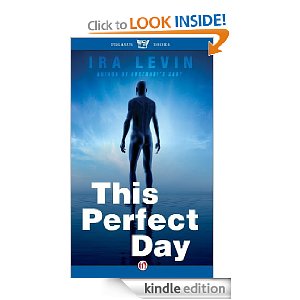
There are more than 900 titles on sale in today’s Cyber Monday Kindle Daily Deal . The sale includes some gems by authors such as Robert McCammon, Iris Murdoch, and Patricia Wentworth.  I just picked up McCammon’s Swan Song  and Ira Levin’s This Perfect Day for $2.99 each The books offered span a variety of genres and also a good selection of non-fiction books, including a variety of knitting books.

Today is the also the last day for the Kindle DX at the sale price of $259.

Penguin Restores Access to Library Books, but…

My, how one day changes things! Penguin has restored access to Kindle versions of their ebooks, but still has concerns, including some that (surprise) need to be worked out with Amazon.  New ebook titles are still not available in OverDrive.

But now, Random House has announced that it is reviewing its own library ebook policies.

As the story evolves, Twitter users are labeling Tweets about the issue with the hashtag #penguinod.

Yesterday (Tuesday) was a day of a lot of speculation on possible reasons for Penguin’s actions. It was also a day of reactions from both librarians and patrons.

An article in the Library Journal’s Digital Shift detailed how complaints from angry patrons surprised librarians who had no advance warning that the books were being pulled. The tension between Penguin and Amazon, along with a past history of difficult negotiations is also cited in the article as a possible reason for the books’ removal from the OverDrive System.

OverDrive’s initial announcement mentioned “security concerns” with the ebooks. The Digital shift article also reported that patrons has stated that, at least in some incidences, books are remaining on the patrons’ Kindles after the lending period is over.

And from Paid Content, there’s a thoughtful article by Laura Hazard Owen that offers answers to its own questions in  Why Might a Publisher Pull Its E-Books From Libraries?

In a piece from Teleread, InfoDocket’s Gary Price points to a February 2011 letter by OverDrive CEO Steve Potash  published on Librarian by Day as a possible explanation for Penguin’s actions:

In addition, our publishing partners have expressed concerns regarding the card issuance policies and qualification of patrons who have access to OverDrive supplied digital content. Addressing these concerns will require OverDrive and our library partners to cooperate to honor geographic and territorial rights for digital book lending, as well as to review and audit policies regarding an eBook borrower’s relationship to the library (i.e. customer lives, works, attends school in service area, etc.). [EMPHASIS ADDED] I can assure you OverDrive is not interested in managing or having any say in your library policies and issues. Select publisher terms and conditions require us to work toward their comfort that the library eBook lending is in compliance with publisher requirements on these topics.

When this letter was originally written back in February during the licensing change demanded by Harper Collins, it seemed that this paragraph seemed squarely directed at concerns over libraries like The Free Library of Philadelphia.

Long before the Kindle allowed library lending, the Free Library had long been discussed on sites like Kindleboards.com and the MobileRead.com forums as a source of library ebooks. The library allowed out-of-state residents to get a library card for a fee.  Users could then use their computers and the OverDrive system to access the ebooks.

Because of its large collection, the Free Library has been very affected by loss of Penguin ebooks and is keeping its patrons updated on its blog.

This whole situation is making it confusing for consumers who have bought or were planning to buy ereaders as gifts for the holidays. The prices of Kindles have come down significantly ($79 for the entry-level e-ink,  $199 for the Kindle Fire). But many consumers have been adamant that lending and library books are an essential part of the equation.

Competitor Barnes and Noble has already announced that its Simple Touch Nook will be only $79 on Black Friday. Kobo is selling its Touch at more retail stores and plans to offer wi-fi Kobo readers for only $59. Ereaders and tablets will likely be big sellers this holiday season.

Sarah from the Smart Bitches, Trashy Books blog did a nice write-up on this whole situation yesterday and summed it up succinctly: ” Holy crap in a sidecar, you cannot make up lunacy this frustrating. I need to read a romance. STAT.”

Yeah, Sarah, save one for me. I am sure we haven’t heard the last of this….

Penguin pulls Kindle Books from libraries

I wanted to sit down and write my impressions of the Kindle Fire now that I have had a few days to play with it. Instead, I was shocked to find that Penguin has pulled its Kindle books from the OverDrive system.

According to OverDrive:

Last week Penguin sent notice to OverDrive that it is reviewing terms for library lending of their eBooks.   In the interim, OverDrive was instructed to suspend availability of new Penguin eBook titles from our library catalog and disable “Get for Kindle”  functionality for all Penguin eBooks.   We apologize for this abrupt change in terms from this supplier.  We are actively working with Penguin on this issue and are hopeful Penguin will agree to restore access to their new titles and Kindle availability as soon as possible.

The Digital Shift is reporting that Penguin is saying the new policy is not specific to Kindles, but governs all versions of their ebook titles across the board.

Libraries and patrons are telling a different story, however. In an Amazon forum on the subject, some patrons are pointing out that only Kindle versions are disappearing. Some libraries have had as many books vanish from their digital shelves. It is important to note that those are books purchased with library funds (generally taxpayer funded).

I don’t think that it is coincidental that this is happening when Amazon is trying to start a Kindle Owner’s Lending Library. There has been a lot of tension about ebook lending since Big Six publisher Harper Collins limited libraries to only 26 check-outs of their titles.  Many people (myself included) are still boycotting Harper Collins  until that limitation is resolved.

Penguin has already been facing criticsm over its Book Country “service,” which many authors believe does nothing but take more money from authors.

But to single out the popular Kindle smacks not only of fear and greed, but a form of censorship as well. And that’s not something that sets well with me. Sure, I could read books on one of my other devices: I’ve got an iPod, a Nook. I could read any format on one of the apps on my android tablets. But I will not be told which device I have to read their ebooks on. I already boycott MacMillian and Harper Collins because of their practices. I already boycott books priced over $9.99. I will be happy to add Penguin to the list as well.